New CLI

Orgonaut from the terminal.

Inspect your org, model changes in scenarios, and give Codex or Claude Code a safer surface for live reads and draft work.

Agent-ready

Use the optional orgonaut-cli skill with Codex or Claude Code.

Reporting

Trees, summaries, rosters, velocity, and lineage.

Safe writes

Inspect Live, then switch into a scenario to explore the impact.

Install

One command to install

Install the standalone CLI from the app host.

curl -fsSL https://app.orgonaut.co/cli/install.sh | sh
Binary Standalone install
Next step orgonaut auth login
Install

Install the CLI. Add the skill for agent use.

The binary is enough for terminal work. The companion skill is optional for Codex and Claude Code.

Use the hosted installer for the normal setup path. If you prefer to fetch binaries directly, use the app-hosted release URLs below.

Install

The hosted installer fetches the correct standalone binary from stable Orgonaut download URLs.

curl -fsSL https://app.orgonaut.co/cli/install.sh | sh

Then log in

Approve the browser prompt on your tenant host, then return after the success confirmation.

orgonaut auth login --tenant acme

Prefer a direct download? Use the app-hosted release URLs below for stable binaries and versioned assets.

Agent skill

Optional companion skill for Codex and Claude Code.

Install the CLI for terminal work. Add the hosted orgonaut-cli skill when you want an agent to use the same guardrails.

The skill is optional. It teaches the tenant-first login flow, the post-login checks, the live-versus-scenario boundary, and the JSON discovery commands that match the shipped CLI surface.

Tenant-first login

Use orgonaut auth login --tenant <slug> and approve the browser prompt on your tenant host.

Context checks

Run orgonaut doctor and orgonaut context show before deeper work starts.

Live versus scenario

Keep live mode read-only and use scenario context for writes.

Command discovery

Use orgonaut commands --json and orgonaut help <path> --json for discovery.

Prefer to pin a released version? Swap the latest manifest URL for https://app.orgonaut.co/cli/skills/vX.Y.Z/orgonaut-cli/SKILL.md.

Codex

Install the latest hosted skill into Codex's skills directory.

mkdir -p ~/.codex/skills/orgonaut-cli
curl -fsSL https://app.orgonaut.co/cli/skills/latest/orgonaut-cli/SKILL.md \
  -o ~/.codex/skills/orgonaut-cli/SKILL.md

Claude Code

Install the same hosted skill into Claude Code when you want it to use the CLI safely.

mkdir -p ~/.claude/skills/orgonaut-cli
curl -fsSL https://app.orgonaut.co/cli/skills/latest/orgonaut-cli/SKILL.md \
  -o ~/.claude/skills/orgonaut-cli/SKILL.md
Usage

High-leverage commands

Use the CLI for reporting, safe scenario work, and commands that humans and agents can use without guesswork.

Agents

Let the CLI define the surface

The optional skill pushes Codex and Claude Code to ask the CLI what is supported before acting.

                  $ orgonaut commands --json
$ orgonaut help report org-units summary --json
$ orgonaut help scenario positions create --json
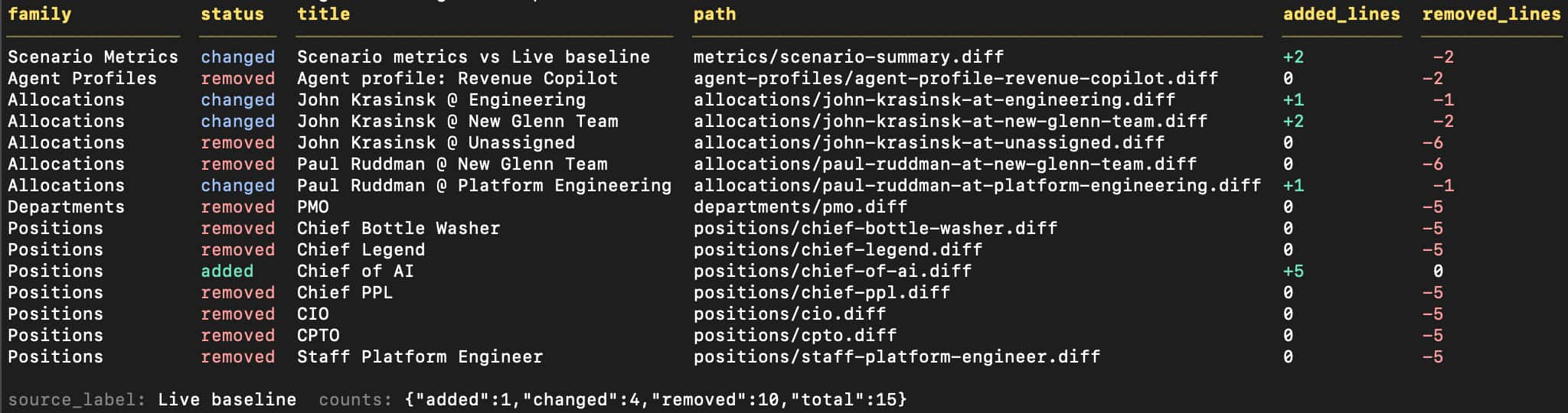
                
Context

Confirm context before acting

Confirm connectivity, auth, tenant, and mode before a human or agent does anything else.

                  $ orgonaut doctor
CONNECTIVITY   AUTH   TENANT   CONTEXT
ok             ok     acme     live

$ orgonaut context show
PROFILE        TENANT     MODE
acme-prod  *   acme       live

$ orgonaut context scenario use q3-restructure
Scenario context saved.
                
Reporting

Pull the right reads

Use tree views, summaries, rosters, velocity, and lineage as direct inputs for planning and review.

                  $ orgonaut live org-units tree
$ orgonaut report org-units summary
$ orgonaut report org-units roster
$ orgonaut report teams velocity
$ orgonaut report scenarios lineage
                
Scenarios

Draft changes in a scenario

Create the scenario, switch into it, inspect the delta, and submit when the plan is ready.

                  $ orgonaut scenario create --name "Q3 Restructure"
$ orgonaut context scenario use q3-restructure
$ orgonaut scenario positions create --input position.json
$ orgonaut scenario delta
$ orgonaut scenario submit
                
Login

Tenant-first browser login.

Use the browser path for normal setup. Use --token only for CI, automation, or headless hosts.

Run orgonaut auth login --tenant acme, approve the browser prompt on your tenant host, and return after the success confirmation. The CLI saves a local profile automatically so you or an agent can keep working from the same context.

This is the same login path the optional companion skill teaches to Codex and Claude Code. Use --token only when there is no browser available.

CI or headless login

Use a pre-created CLI-capable token only when browser login is not available.

orgonaut auth login \
  --tenant acme \
  --token '<bearer-token>'
Platforms

macOS and Linux standalone binaries.

Choose the binary that matches your environment. Each asset links to the app-hosted direct download URL.

macOS (Apple Silicon)

orgonaut-darwin-arm64 Direct download

macOS (Intel)

orgonaut-darwin-x64 Direct download

Linux x86-64

orgonaut-linux-x64 Direct download

Linux ARM64

orgonaut-linux-arm64 Direct download

Empower your agents with the Orgonaut CLI and its companion skill

Use the same command surface for live reads, reporting, scenario work, and agent-driven workflows.