Evidence scanned
Visible Jira work structures
- Visible Jira projects and project metadata
- Boards and sprint metadata
- Components and selected issue metadata
Portable organization specification and CLI
OrgSpec is a machine-readable specification and standalone CLI for describing teams, people, agents, roles, reporting lines, work, capabilities, solutions, and operating-model change.
It gives Orgonaut and ecosystem tools a shared data layer for generating, validating, visualising, benchmarking, and exchanging organization models. OrgSpec for Jira is the first completed channel app built on that standard.
curl -fsSL https://app.orgonaut.co/orgspec/install.sh | shactors:
- id: actor_build_agent
kind: agent
name: Build Reliability Agent
capabilities:
- build-analysis
- release-risk
units:
- id: unit_platform
kind: team
name: Platform
placements:
- actor: actor_build_agent
unit: unit_platform
allocation: 1.0OrgSpec is the standard
A machine-readable specification for organization structure and operating models that can move across tools.
Orgonaut plans scenarios
Use Orgonaut when portable OrgSpec files need collaboration, governance, rollups, and scenario planning.
First ecosystem app live
OrgSpec for Jira turns visible Jira work into a validated, portable organisation baseline.
OrgSpec ships as a standalone binary for macOS and Linux. No Node.js runtime or Orgonaut account is required for local file workflows.
Install
Fetch the latest standalone binary from the app host.
curl -fsSL https://app.orgonaut.co/orgspec/install.sh | shVerify
Confirm the CLI is on your path.
orgspec --helpPinned version
curl -fsSL https://app.orgonaut.co/orgspec/install.sh \
  | ORGSPEC_VERSION=v0.2.0 sh
Custom directory
curl -fsSL https://app.orgonaut.co/orgspec/install.sh \
| ORGSPEC_INSTALL_DIR=$HOME/.local/bin shNeed a pinned version or manual download? Use the app-hosted release URLs.
Most org chart tools flatten structure into a person, a title, a department, and a manager.
That works until you need to model vacancies, matrixed teams, fractional allocation, AI agents, robots, dotted-line relationships, or a future structure you have not approved yet.
OrgSpec gives those facts a portable definition so the chart can move between spreadsheets, repositories, diagrams, analysis scripts, and Orgonaut without losing the meaning of the organization.
Jira shows how work flows. HRIS platforms hold people and role data. GitHub and Azure DevOps show engineering ownership. Spreadsheets hold the unofficial truth. OrgSpec gives these systems a shared, portable language for describing the organisation.
OrgSpec is designed to sit above the tools where organisational structure already hides: Jira boards, HRIS records, GitHub teams, Azure DevOps projects, spreadsheets, planning documents, Confluence pages, and transformation decks.
Ecosystem tools can generate, validate, visualise, benchmark, and exchange OrgSpec so teams can move from scattered operational data to a clear, machine-readable model.
Designed for ecosystems including
OrgSpec for Jira is live. Other named systems remain ecosystem targets unless marked supported.









First channel product: OrgSpec for Jira generates a machine-readable organisation baseline from visible Jira work structures.
First channel product
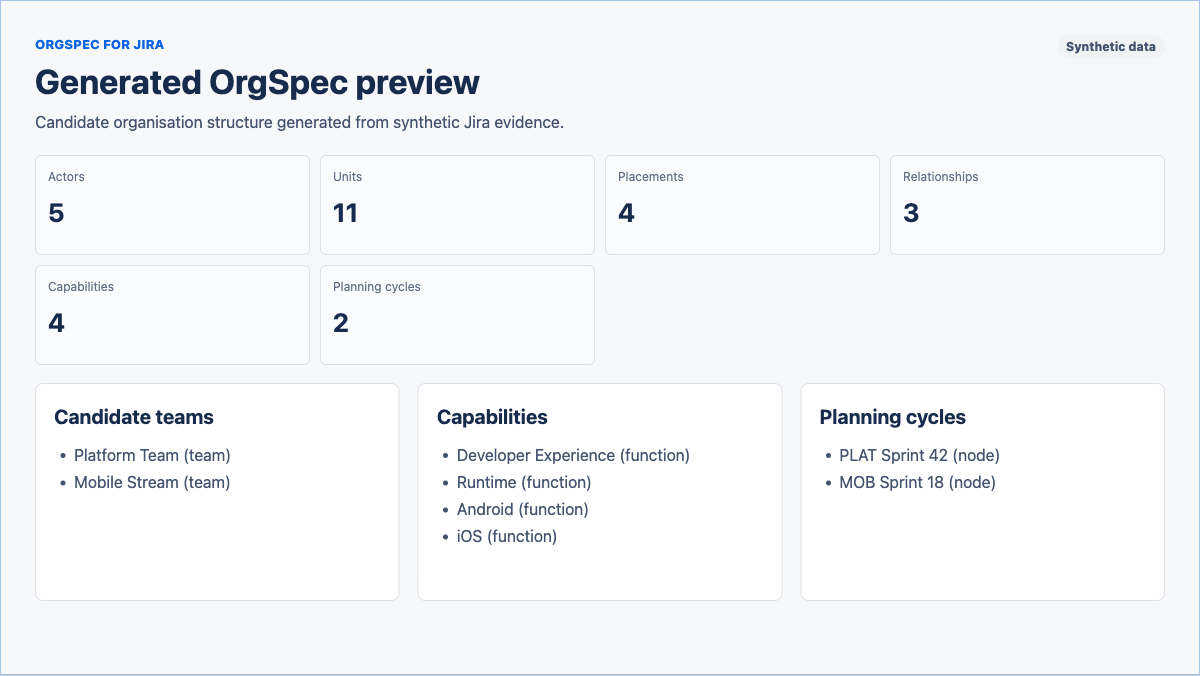
Scan visible projects, boards, sprints, components, and issue metadata. Review the generated OrgSpec with diagnostics, confidence notes, and validation status. Export portable files for planning and design.
Evidence scanned
Candidate and exports
The generated candidate includes diagnostics, confidence notes, validation status, and a mapping report preview.
Evidence quality
Missing-data prompts and confidence notes make inferred teams, relationships, roles, and allocations easy to review before export.
Turn source-system evidence into a current-state or future-state OrgSpec. OrgSpec for Jira is the first live generator in the ecosystem.
Check missing relationships, hierarchy cycles, duplicate identities, allocation issues, provenance, and scenario readiness before the model moves downstream.
Import into Orgonaut, visualise changes, compare scenarios, benchmark structures, and exchange organization models with tools that understand the specification.
A file can stay simple, or connect structure to work, capabilities, solutions, provenance, and non-human contributors.
People, AI agents, robots, and future actor kinds. OrgSpec starts with actors because modern work is no longer only human headcount.
kindnameemailtitlecapabilitiesasset_idrobot_class Departments, teams, functions, groups, nodes, and cost centers with hierarchy and leads.
kindnameparentlead_actorpurpose Seats that can be occupied, vacant, planned, frozen, or closed.
titleunitstatusrole_familylevelfte The link between actors, units, and positions. Placements carry allocation, primary membership, and effective dates.
actorunitpositionprimaryallocationfte Reporting lines, dotted lines, ownership, support, supervision, and membership.
kindfromto A portable work catalogue with categories, activities, and assignments to units, positions, actors, or role families.
work_categorieswork_activitieswork_assignmentstime_shareemphasis What the organization must be able to do, with contextual assessments, work contributions, and measurable outcomes.
outcomecapability_assessmentscapability_workcapability_measures Governed copilots, agents, automations, workflows, platforms, and service assets, including versioned claims, obligations, and deployments.
solution_typesolution_versionssolution_claimssolution_obligationssolution_deployments Provenance for imported facts, so generated org files can explain where each piece of structure came from.
kinduriobserved_atconfidence Import once, validate the model, render a diagram, review structural and operating-model changes, and export a portable payload.
Convert a spreadsheet or HR export into an OrgSpec document.
Catch missing fields, duplicate ids, broken references, hierarchy cycles, reporting cycles, and invalid operating-model links.
Generate Mermaid, SVG, or graph JSON for review, documentation, and internal tools.
Compare two org states and get a readable summary of structural, work, capability, and solution changes.
Write canonical JSON or an Orgonaut bridge payload.
CLI workflow
A complete local path from spreadsheet to Orgonaut bridge payload.
orgspec import people.csv \
  --mapping manager_email \
  --format json \
  --out org.orgspec.json \
  --org-id acme \
  --org-name "Acme Ltd"

orgspec validate org.orgspec.json
orgspec render org.orgspec.json --format svg --out org.svg
orgspec diff january.orgspec.json february.orgspec.json --format markdown
orgspec export org.orgspec.json --format orgonaut --out orgonaut-import.jsonJSON and YAML files describe structure alongside work, capabilities, and the solutions used to deliver them.
Readable source file
This example models a human leader, an AI agent, a robot, a team, an occupied position, and a reporting edge.
orgspec: "0.2"
organization:
  id: acme
  name: Acme Ltd

actors:
  - id: actor_mara
    kind: person
    name: Mara Chen
    title: VP Engineering

  - id: actor_build_agent
    kind: agent
    name: Build Reliability Agent
    capabilities:
      - build-analysis
      - release-risk

  - id: actor_lab_robot
    kind: robot
    name: Lab Robot 12
    asset_id: ROBOT-12
    robot_class: prototype-lab

units:
  - id: unit_engineering
    kind: department
    name: Engineering
    lead_actor: actor_mara

  - id: unit_platform
    kind: team
    name: Platform
    parent: unit_engineering

positions:
  - id: position_ai_build_agent
    title: AI Build Agent
    unit: unit_platform
    status: occupied

placements:
  - id: placement_agent_platform
    actor: actor_build_agent
    unit: unit_platform
    position: position_ai_build_agent
    primary: true
    allocation: 1.0

relationships:
  - id: rel_agent_reports_to_mara
    kind: reports_to
    from:
      type: actor
      id: actor_build_agent
    to:
      type: actor
      id: actor_mara

work_categories:
  - id: work_category_reliability
    name: Reliability

work_activities:
  - id: work_release_reliability
    name: Release reliability
    category: work_category_reliability

work_assignments:
  - id: assignment_release_platform
    activity: work_release_reliability
    unit: unit_platform
    emphasis: primary

capabilities:
  - id: capability_safe_delivery
    name: Safe software delivery
    outcome: Releases remain dependable and recoverable.

solutions:
  - id: solution_build_copilot
    name: Build Copilot
    solution_type: agent
    lifecycle_status: active
Machine-friendly document
Use JSON when you want deterministic exchange with scripts, dashboards, and review tools.
{
  "orgspec": "0.2",
  "organization": {
    "id": "acme",
    "name": "Acme Ltd"
  },
  "actors": [
    {
      "id": "actor_mara",
      "kind": "person",
      "name": "Mara Chen",
      "title": "VP Engineering"
    },
    {
      "id": "actor_build_agent",
      "kind": "agent",
      "name": "Build Reliability Agent",
      "capabilities": ["build-analysis", "release-risk"]
    },
    {
      "id": "actor_lab_robot",
      "kind": "robot",
      "name": "Lab Robot 12",
      "asset_id": "ROBOT-12",
      "robot_class": "prototype-lab"
    }
  ],
  "units": [
    {
      "id": "unit_engineering",
      "kind": "department",
      "name": "Engineering",
      "lead_actor": "actor_mara"
    },
    {
      "id": "unit_platform",
      "kind": "team",
      "name": "Platform",
      "parent": "unit_engineering"
    }
  ],
  "placements": [
    {
      "id": "placement_agent_platform",
      "actor": "actor_build_agent",
      "unit": "unit_platform",
      "primary": true,
      "allocation": 1.0
    }
  ],
  "work_categories": [{
    "id": "work_category_reliability",
    "name": "Reliability"
  }],
  "work_activities": [{
    "id": "work_release_reliability",
    "name": "Release reliability",
    "category": "work_category_reliability"
  }],
  "work_assignments": [{
    "id": "assignment_release_platform",
    "activity": "work_release_reliability",
    "unit": "unit_platform",
    "emphasis": "primary"
  }],
  "capabilities": [{
    "id": "capability_safe_delivery",
    "name": "Safe software delivery",
    "outcome": "Releases remain dependable and recoverable."
  }],
  "solutions": [{
    "id": "solution_build_copilot",
    "name": "Build Copilot",
    "solution_type": "agent",
    "lifecycle_status": "active"
  }]
}
Validate, render, and diff
The same file can be checked locally, rendered into docs, and compared against another org state.
orgspec validate acme.orgspec.yaml
orgspec render acme.orgspec.yaml --format mermaid --out acme.mmd
orgspec diff january.orgspec.json february.orgspec.json --format markdownUse Mermaid for docs, SVG for quick sharing, and graph JSON when you want to build your own visualization.
orgspec render org.orgspec.yaml --format mermaid --out org.mmd
orgspec render org.orgspec.yaml --format svg --out org.svg
orgspec render org.orgspec.yaml --format json --out org.graph.jsonCompare two states and get a readable Markdown summary of material org changes.
orgspec diff before.orgspec.json after.orgspec.json --format markdown# OrgSpec Diff
- Added Actor: Build Reliability Agent
- Changed Actor Kind: Lab Robot 12
- Moved Unit: Platform
- Changed Reporting Edge: Build Reliability Agent reports to Mara Chen
- Changed Placement: Build Reliability Agent allocation 1.0 -> 1.25
- Added Work: Release reliability
- Changed Capability: Safe software delivery
- Added Solution: Build CopilotOrgSpec is the standard. Orgonaut is the scenario-planning platform. The bridge export preserves structure, work, capabilities, and solutions for Orgonaut import tooling while keeping the specification portable.
Use OrgSpec when you need current-state or future-state organization models that can move between systems. Use Orgonaut when those models need scenario planning, permissions, audit history, AI assistance, rollups, governance, and stakeholder-ready visual workflows.
Bridge export
orgspec export org.orgspec.yaml --format orgonaut --out orgonaut-import.jsonOrgSpec stays portable and deterministic while leaving product workflows to Orgonaut.
OrgSpec does not require an Orgonaut account and does not store Orgonaut tenant ids, scenario ids, or internal database ids.
People are a kind of actor. Agents and robots are first-class because future org charts need to show both human and non-human contributors.
Simple files can describe people, teams, and reporting lines. Higher-fidelity files can describe positions, vacancies, allocation, and planned starts.
OrgSpec describes a structure state. Planning workflows, scenario sandboxes, snapshots, approvals, and promotion are application behavior. Orgonaut handles those when you need them.
Validation, rendering, diffing, and canonical export are designed to be stable enough for automation and code review.
The practical details for installing and using the CLI with local files.
Not today. OrgSpec is distributed as an Orgonaut-hosted CLI binary. The format is portable, and the CLI works with local files, but the implementation remains private while the protocol matures.
No. Local OrgSpec commands such as import, validate, render, diff, and export do not require an Orgonaut account.
macOS Apple Silicon, macOS Intel, Linux x86-64, and Linux ARM64.
The first CLI release supports CSV imports with manager-email, manager-id, and department-path mapping presets. More HRIS-specific presets can be added later.
It scans Jira structures visible to the user and generates a candidate OrgSpec baseline with diagnostics, confidence notes, validation status, a mapping report preview, and four portable export files.
No. OrgSpec is the portable organization specification and data layer. Orgonaut is the scenario-planning platform for collaboration, governance, imports, AI assistance, metrics, and visual workflows.
No. A file can represent a current or future structure, but scenarios and snapshots are not top-level OrgSpec schema entities.
Yes. person, agent, and robot are core actor kinds in OrgSpec 0.2.
Yes. OrgSpec 0.2 adds Work, Capabilities, and governed Solutions so a file can describe what the organisation does, what it must be able to do, and the copilots, agents, automations, workflows, platforms, or service assets used to support it.
Yes. OrgSpec files are JSON or YAML, and the CLI can export deterministic canonical JSON and Markdown diffs.
Start locally
Install OrgSpec, convert a CSV, validate the structure, and render the chart locally in minutes.